Drupal Planet

Add highlight.js Syntax Highlighting to a Gatsby-rendered Drupal Website

When every tutorial for syntax highlighting in Gatsby talks about highlight.js markdown but you have a Drupal website, you need to write your own for posterity. Here's mine.

This website uses the very helpful CKEditor CodeSnippet module to provide syntax highlighting. That in turn uses highlight.js. However, while investigating using Gatsby for the frontend of this website, I came across the headache of adding code highlighting to the site, when my code is just a string in the body field. Here's my solution ... if you have a better one, let me know in the comments.

Create custom utility function for highlight.js

  • Add highlight.js to your repo npm install highlight.js
  • Create a file at /src/utils/highlightCode.js.
  • Import the library and the CSS style you want to use
  • Set the languages you want to load (we don't need to load all of them for performance reasons)
  • Create a function in this file that finds every instance of your code element and loop through it to let highlight.js work on each instance. That file will look something like this:
import hljs from 'highlight.js'
import 'highlight.js/styles/monokai-sublime.css'

hljs.configure({
  languages: [
    'php',
    'javascript',
    'json',
    'bash',
    'scss',
    'css',
    'yml',
    'twig',
    'html',
  ],
})

export default function highlightCode() {
  const codeBlocks = document.querySelectorAll('pre > code')
  codeBlocks.forEach(codeBlock => {
    if (typeof codeBlock === 'object') {
      hljs.highlightBlock(codeBlock)
    }
  })
}

Use the useEffect() hook to apply this to our template

In my case, I wanted to apply this to the article template, which means attaching it to the

<div dangerouslySetInnerHTML={{ __html: nodeArticle.body.value }} />

but by the time Gatsby has grabbed and rendered that, it's too late. Instead, we add our useEffect() before we render our article - this is basically the hook_preprocess_node() of React! That's looks like this:

// import React, etc, etc

import highlightCode from '../../utils/highlightCode'

export default function SingleArticlePageTemplate({ data }) {
  useEffect(() => {
    highlightCode()
  })
  return (
    <>
      <Layout>

        // Stuff before body field (title, image, etc)

            <div dangerouslySetInnerHTML={{ __html: articleBody }} />

        // Stuff after body field (tags, etc)

      </Layout>
    </>
  )
}

It's pretty simple, hopefully it will help you/save you some time Googling.
Join the "Something nice ..." newsletter

The full title is "Something nice, something quirky, something else".

I send an email once a week with something nice, something quirky, and something else that I think is interesting (all with a web development theme, of course).

Drupal key_value_expire Table is very large because of Honeypot Module

key_value_expire db_size before/after Drupal Honeypot

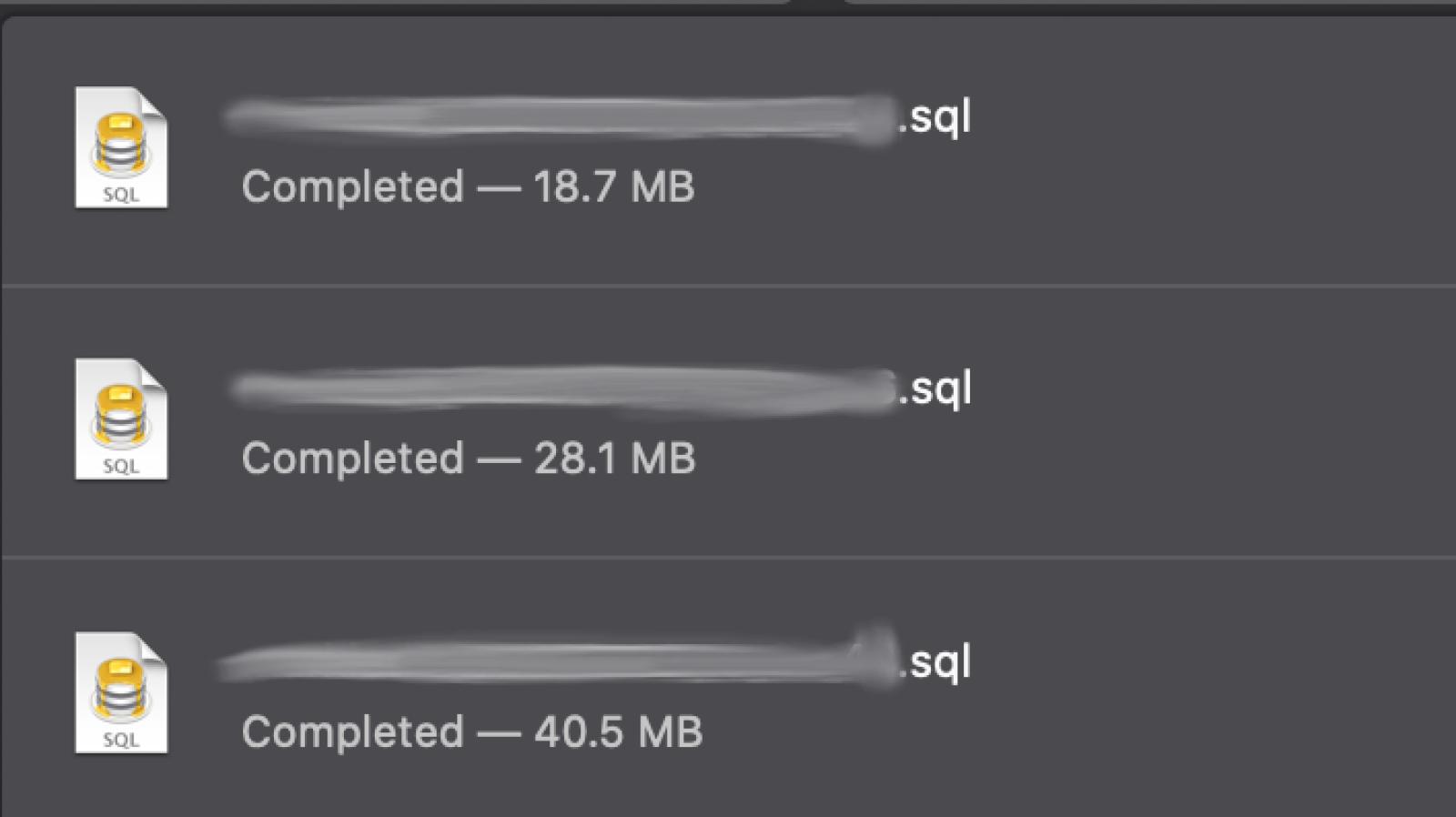
I had a very large key_value_expire table, even though Honeypot module had been uninstalled.

When investigating why I had such a large database on mark.ie (about 50MB - not huge, but a lot for a personal website) this evening, I noticed that the key_value_expire table in the database was about 40MB (after clearing cache). And that most of the entries in it (over 160,000) were for honeypot_time_restriction.

As it turns out, honeypot had been putting a time to expire of Jan 2038, so the table was just getting bigger and bigger. Then I did some Googling and found this: Honeypot key value entries never expire (effectively). That issue has been fixed for newer versions of honeypot, but all the old entries before that update are still in the DB.

There's another issue - Write update hook to clean up old honeypot_time_restriction values - to clean up all the old entries, but it's only at RTBC at the moment, and when it gets into the Honeypot module, it could take a long time for the update hook to run depending on how many entries you have in the table.

For my set up, I just ran DELETE FROM key_value_expire WHERE collection = "honeypot_time_restriction"; directly on the DB. It only took about 10 seconds to delete the 160,000+ rows, and reduced that table from about 40MB to 3MB.

It might be worth checking this on your site to try reduce your DB size.

Join the "Something nice ..." newsletter

The full title is "Something nice, something quirky, something else".

I send an email once a week with something nice, something quirky, and something else that I think is interesting (all with a web development theme, of course).

Printing Values of a Parent Node from a Drupal Paragraphs Field

Someone asked in Slack today how to print the URL of the node that a paragraph is on. I was up to the challenge.

First off, you can do this with php in your .theme file quite easily, but I like to keep my template items in my templates.

Here's the code I used to first get the node id, then the node title, and then create a link from these two pieces of information.

{% set parent = paragraph._referringItem.parent.parent.entity %}


What this does is:


  1. Set a variable called parent - note is uses parent twice and then entity

    You won't see parent or entity in your kint/dpm/dd output, which is a pity because entity is great - load the entity you want to get information from.

  2. Use parent to then get the node id value and title value parent.nid.value and parent.title.value.
  3. Create a link using this variables.


It's quite simple really. You can now use this approach to get other fields/data from your host node.

Join the "Something nice ..." newsletter

The full title is "Something nice, something quirky, something else".

I send an email once a week with something nice, something quirky, and something else that I think is interesting (all with a web development theme, of course).

Writing View Mode Templates in PatternLab

Wanna know my rules when I am writing templates in PatternLab for Drupal view modes such as teasers, cards, search results, etc? Read on, my friend...

BEM Classes for Streamlined Classes

Classes used in the card view mode should be prefixed with card__ not node__

  • We need to make sure that CSS for cards does not leak out into other components
  • We need to make sure we have as little selector specificity as possible - so we have .card__content instead of .card .node__content in our CSS.

Card Variations

If you want to have slight variations for cards, please add that as an option in the classes array. Examples of this might be for a card for a specific content type, or a card when there is no image present, or a card that has the image on the left/right.


{% set classes = [ 
  "card", content_type ? 
  "card--" ~ content_type, image ? 
  "card--has-image" : "card--no-image", 
  alignment ? "card--" ~ alignment, ] 
%} 

This will print:

<article class="card card--event card--no-image card--image-left"></article>

We can then apply overrides using these variations. For example, if the date field on a event is bold but but on a blog is not, we can have code like so:

.card__date { 
  color: $c-grey--darkest; 
} 

.card--event .card__date { 
  font-weight: $fw--bold; 
} 

Avoid Twig Blocks

Try not to use Twig blocks in view modes - {% block image %} If we use Twig blocks, then in the Drupal template anything can be put in the {% block %} to override it. If we change the order of things in the {% block %} in PL, this will have no effect in Drupal, since the Drupal version will be overriding it.

For example, the Drupal template could have something like this:

{% block image %} 
  {{ content.field_date }} 
{% endblock %} 

Avoid Drupal Templates

Try to avoid having templates based on specific content types for view modes. This is usually necessary for Full view mode, but for Teaser, Card, etc let's try to keep them more generic.

If you need to use a content-type template, that is fine; but it should be the exception, not the rule.

In general, since each content type Card should be similar, then each content type should be able to use the same node--card.html.twig template file.

Avoid {% if not page %}

{% if not page %} Should not be needed in view modes. A Card or Teaser will never be a full page. For the same reason, we can usualy leave this out in the content type full view mode templates, since the full view mode will always be a page.

Do Not Hardcode Heading Levels

Unless you know that the Card view mode is never going to have a h2 item above it, do not set h2 or h3 etc as the heading element.

We do not want to have a HTML structure like this:

<h1>Page Title</h1>
  <h2>Views Card Block Title</h2>
  <h2>Card Title</h2>
  <h2>Card Title</h2>
  <h2>Card Title</h2>


Instead, we would like this:

<h1>Page Title</h1>
  <h2>Views Card Block Title</h2>
    <h3>Card Title</h3>
    <h3>Card Title</h3>
    <h3>Card Title</h3>


In general, view modes will take a h2, so let's place that as our default.

{% set card_title_element = card_title_element|default('h2) %}

<{{ card_title_element }}>{{ card_tite }}</{{ card_title_element }}>

Then, in our Drupal template, we can set the element depending on whether it has a parent h2 or not; for example, if it is in a 'Related Content' building block and that building block has a title such as:

<h2 class="related-content__title">Read More Like This</h2>


We can do so in the Drupal template with a variation of this:


{% if node._referringItem.parent.parent.entity.field_p_rc_title.value %} 
  {% set teaser_title_element = 'h3' %} 
{% endif %} 

If the above returns as false, our default h2 from the PL pattern will kick in.

Use Prefixes for Variables

Let's use prefixes for variables, using {{ card_content }} instead of {{ content }}. This will help avoid global variables being used by accident in our components (unless we want them to, such as the image_alt variable from data.json). The {{ content }} if used, will not necessarily print the content of your component when that component is used outside of its own context: for example, if you print a card in a views list in a sample page.

Variables for Specific Content Types

If there's a variable for a specific content type, such as the location field for an event card, we can just wrap that in an {% if %} statement, like so:

{% if content_type == 'event' %}
  {% if event_location %}

    {{ card_location}}

  {% endif %} 
{% endif %} 

Then that variable will not print in any other content type's template.

Join the "Something nice ..." newsletter

The full title is "Something nice, something quirky, something else".

I send an email once a week with something nice, something quirky, and something else that I think is interesting (all with a web development theme, of course).

A Very Simple PoC of Using Voice to Admin a Drupal Website

Speak "voice admin new page" to to to the node create form for basic page

I was playing around with the SpeechRecognition API last night and thought, "wouldn't it be cool if we could use voice to administer a website?". Then, I put together this tiny proof of concept module for use with Drupal.

Here's a short video of it in action.

Ok, that looks pretty cool. Show me the code.

window.SpeechRecognition = window.SpeechRecognition || window.webkitSpeechRecognition; 
const recognition = new SpeechRecognition(); 

recognition.interimResults = true; 
recognition.addEventListener('result', e => { 
  transcript = Array.from(e.results).map(result => result[0]).map(result => result.transcript).join(''); 
  const statement = e.results[0][0].transcript; 
  console.log(statement); 
  if (statement === "voice admin new page") { 
    window.location.href = "/node/add/page"; 
  } else if (statement === "voice admin new article") { 
      window.location.href = "/node/add/article"; 
    } else if (statement === "voice admin log out") { 
      window.location.href = "/user/logout"; 
    } else if (statement === "voice admin go home") { 
      window.location.href = "/en"; 
    } 
  }); 

// When we stop talking, start the process again, so it'll record when we start 
// talking again. recognition.addEventListener('end', recognition.start); recognition.start(); 

WTF? That code is crap. You have hard-coded what you want the site do to. That's not going to work for all sites, only for your specific use case.


Yep, that's true at the moment. Like I say, it's just a proof-of-concept. We'd need to create a settings page for users to decide if they want it to be available or not. And we'd have to create a better parsing system that listens for "voice admin" and then starts recording. Then we'd need to make sure that it patches together the fragments of speech after this to construct the action that you want to perform. Following that, it would be really cool if on the settings page users could type in commands and responses that SpeechRecognition will listen for and then perform.


I think all this is very possible, and probably not too much work. It would be great to see more progress on this.


If you'd like to create a pull request, the code is available on GitHub.


Join the "Something nice ..." newsletter

The full title is "Something nice, something quirky, something else".

I send an email once a week with something nice, something quirky, and something else that I think is interesting (all with a web development theme, of course).

Printing Regions in Views in Different Places Using the Same Template

We had a case where on some views we needed to print the header above the exposed filters and on others we needed to print the header after the exposed filters. Here's my simple solution.

This is rather simple, in my views template (list.twig I call it, as I am using PatternLab), I created the following:

{% if not header_after_exposed and header %}
  {{ header }}
{% endif %} 

{% if exposed %}
  {{ exposed }}
{% endif %} 

{% if header_after_exposed and header %}
  {{ header }}
{% endif %} 

Now, in my corresponding views template in Drupal - views-view--search.html.twig - I just use that template and set the header_after_exposed variable to true.

 {% set header_after_exposed = true %} {% include '@content/list/list.twig' %} 

Join the "Something nice ..." newsletter

The full title is "Something nice, something quirky, something else".

I send an email once a week with something nice, something quirky, and something else that I think is interesting (all with a web development theme, of course).

PatternLab: Linking to Patterns

Linking patterns allows us to give our users a real feeling for how the website is going to work, on real devices, which things like InVision can never do. Here's some simple approaches.

When using PatternLab, you can link to a pattern by creating a variable such as {{ url }}. Then in your corresponding JSON or YML file, you can setting this variable equal to something like

url: link.pages-contact

or

url: link.pages-homepage.

We often use this when creating menu items, since in Drupal our menu items template looks for two parts to the menu link: title and url, something like this:

 menu: 
  items: 
    item_1:
       title: 'About Us' 
       url: link.sample-pages-basic-page 
    item_2: 
      title: 'Contact Us' 
      url: link.sample-pages-basic-page-contact-us 

This works great when working with a template that has a specific variable for the URL, such as the link to a node in node.html.twig, so we can link the title in our teaser template in PL to our sample blog pattern, for example.

But if we have a link field, such as a Call to Action in a paragraph bundle we might have something like this in our pattern:

<div class="cta__link">{{ cta_link }}</div>

and this in our corresponding YML file:

cta_link: 'Click Me!' 

We don't have PL paths in those links, because if we swap `#` for a `link.sample-pages-basic-page` it'll just render that as a string. And we don't want to break the variable into two parts, because in the Drupal template, we want to be able to {% set cta_link = content.field_cta %} and let Drupal do all its render magic.

The solution? Don't break up variable into two parts, concatenate what you want in YML instead to allow us to link to specific patterns:

cta_link: 
  join(): - '<a href="'
    - link.sample-pages-basic-page-with-quote
    - '">See Ways to Help</a>'

Now, the first part will render as a string, the second as a variable to the pattern you want to link to, and the third part as a string.

We could also create a link pattern, and do something like this:

cta_link: 
  include(): 
    pattern: 'organisms-link' 
    with: 
      url: 'link.sample-page-homepage' 

I don't, because, in general, I don't like patterns to depend on other patterns. This is simply so I can drag and drop them from project to project without any friction. Each component has everything it needs contained within it. It also means in case of something like a link field, we can let Drupal do as much of the heavy lifting as possible.

Join the "Something nice ..." newsletter

The full title is "Something nice, something quirky, something else".

I send an email once a week with something nice, something quirky, and something else that I think is interesting (all with a web development theme, of course).

Creating an 'Add to Calendar' Widget in Drupal

A simple request: we need an 'Add to Calendar' widget to add our events to Google Calendar, iCal, and Outlook. Simple (once I had completed it!).

There's a module for that. There is, it's called, obviously, addtocalendar. It works very well, if you:

If you don't want to use an external service for something as simple as adding an event to a calendar, then it looks like you'll need a custom solution. Their smallest plan only allows 2 events per month.

The PatternLab Part

Here's the custom solution I came up with (in the future, I'll look at creating a module for this with a settings/UI page for site builders). Note, it's a PatternLab implementation; if you don't use PatternLab and just want to work directly in your Drupal theme, it would be even easier.

Here's the code for the 'Add to Calendar' pattern in PatternLab (some classes and things are removed to make it easier to read):

{% set classes = [ "add-to-calendar" ] %} 

{% set ical_link = 'data:text/calendar;charset=utf8,BEGIN:VCALENDAR%0AVERSION:2.0%0ABEGIN:VEVENT%0ADTSTART:' ~ atc_start_date|date("Ymd\\THi00\\Z") ~ '%0ADTEND:' ~ atc_end_date|date("Ymd\\THi00\\Z") ~ '%0ASUMMARY:' ~ atc_title ~ '%0ADESCRIPTION:' ~ atc_details|striptags ~ '%0ALOCATION:' ~ atc_location|replace({'<br />
': ' ', '<br />
': ' ', '
<p>': ' ', '</p>
': ''}) ~ '%0AEND:VEVENT%0AEND:VCALENDAR' %}

{% set google_link = 'https://www.google.com/calendar/r/eventedit?text=' ~ atc_title ~ '&amp;dates=' ~ atc_start_date|date("Ymd\\THi00\\Z") ~ '/' ~ atc_end_date|date("Ymd\\THi00\\Z") ~ '&amp;details=' ~ atc_details|striptags ~ '&amp;location=' ~ atc_location|replace({'<br />
': ' ', '<br />
': ' ', '
<p>': ' ', '</p>
': ''}) %} 

<div{{ attributes.addclass="{{ classes }}"
  <a href="{{ google_link }}">Add to Google Calendar</a> <a href="{{ ical_link }}">Add to iCal</a> <a href="{{ ical_link }}">Add to Outlook</a> 
</div>


What does the above code do?

  • Creates a Google Calendar variable and creates an iCal variable. Outlook will also use iCal.
  • Uses these variables as links to add the event to their respective calendars.

Within the variables, we have some more variables (start date, end date, etc), which we should probably wrap in conditional statements so that their clauses don't print unless they are present in Drupal (some fields might be optional on your event content type, such as end time).

These variables are:

  • atc_start_date: Start Date and time
  • atc_end_date: End Date and time
  • atc_title: the name of the event
  • atc_details: description for the event
  • atc_location: place of event

In our Event pattern in PatternLab, we then have a variable called 'add_to_calendar' so that events have the option to have this widget or not. In event.twig, we simply print:

 {% if add_to_calendar %} {% include '@site-components/add-to-calendar/add-to-calendar.twig' %} {% endif %} 


The Drupal Part

In Drupal we create a boolean field on our event content type field_event_add_to_calendar, if this is ticked, we will display the Add to Calendar widget.

Here's the code from node--event--full.html.twig

{# Set the Add to Calendar Variables #} 

{% if node.field_add_to_calendar.value %} 
  {% set add_to_calendar = true %}
{% endif %} 

{% if node.field_event_date.value %} 
  {% set atc_start_date = node.field_event_date.value %} 
{% endif %} 

{% if node.field_event_date.end_value %} 
  {% set atc_end_date = node.field_event_date.end_value %} 
{% endif %} 

{% if node.title.value %} 
  {% set atc_title = node.title.value %} 
{% endif %} 

{% if node.field_event_intro.value %} 
  {% set atc_details = node.field_event_intro.value %} 
{% endif %} 

{% if node.field_event_location.value %} 
  {% set atc_location = node.field_event_location.value %} 
{% endif %} 

... 

{% include "@content/event/event.twig" %} 


To explain:

If the 'Add to Calendar' boolean is on, we set the add to calendar variable as true. This in turn tells patternlab to render the Add to Calendar component. We then check if each field we might use has a value in it - such as a start date and end date. If so, we map the values from each of those fields to variables in our Add to Calendar component (such as atc_start, atc_title, etc)

Now, when you view a node, you will see your Add to Calendar widget on any nodes that the editors choose to put it. You can see a sample of the Add to Calendar widget in my PatternLab.

Simple, once I figured it out.

Got an improvement for this? The comments are open.

Join the "Something nice ..." newsletter

The full title is "Something nice, something quirky, something else".

I send an email once a week with something nice, something quirky, and something else that I think is interesting (all with a web development theme, of course).

Can I Stop PatternLab Variants from Inheriting Data from their Parent Component

I have a card component with a title, image, text, and link. How come all my card variants are inheriting all the values from the default one? Short answer, you don't. It's a feature, not a bug.

Where this really becomes frustrating is when you have a pattern that lists a number of items in an array. In that case, all variants will have (at least) that many items, even though you may want fewer.

For illustration:

list.twig has something like this:

 {% for list_item in list_items %} 
  {{ list_item }} 
{% endfor %} 


Then list.yml has something like this:

 list_items: 
  - join(): 
    - include(): pattern: content-teaser 
  - join(): 
    - include(): pattern: content-teaser 
  - join(): 
    - include(): pattern: content-teaser
  - join(): 
    - include(): pattern: content-teaser 
  - join(): 
    - include(): pattern: content-teaser 
  - join(): 
-- loads of more teasers for the main listing page 

Now you want to create a variant of list such as list~related-articles, but with only 2 items. You'd expect this would work

 list_items: 
  - join(): 
    - include(): pattern: content-teaser 
  - join(): 
    - include(): pattern: content-teaser 

But, no. This will still render as many items as were in the parent component. That's the beauty (a feature, not a bug) of PatternLab's inheritance system. To stop it you need to do something like this:

 list_items: 
  - join(): 
    - include(): pattern: content-teaser 
  - join(): 
    - include(): pattern: content-teaser 
    - - - and so on, so each extra one is basically set to 'false' 

When we do this with a component such as a card, we might also want to have variants such as card~no-image, card~no-text, etc. In this case, we'd have a card.yml like so:

​card_title: 'My Card Title' 
card_image: '' 
card_text: 'The text of the card will go here'
​

However, if we create variants, each of the items in card will be inherited to the variant. You'll notice this if you try to create one super mega component for all variants of a hero component for example (hero title, pre-title, sub-title, image, alignment, cta buttons, etc).


In this case, what I do is create a default component card.yml or hero.yml and give it only values for items that will more than likely be in all variants (basically whatever you are going to mark as a required field in Drupal (or whatever CMS you are using)), then set all others to 'false' in the component. Now when I create variants I only need to override the specifics for that variant, since everything else that is being inherited is already set to false. I also create a 'Kitchen Sink' version of the component which shows every item in action but DO NOT create this as the default/reference component.


My default card.yml might look like this:

card_title: 'My Card Title' 
card_image: false 
card_text: false 

Now my variants can look as simple as:

card~with-image.yml

​card_image: ''

And card~long-title will be just one line:

 card_title: 'This is a long title on a card just to illustrate what happens when it wraps to more than one line' 

And that is why this is a feature, not a bug - it allows us to write variants very simply and quickly. Is there a better way of doing this? I'm not aware of one. If you are, drop it in the comments. Thanks.


Join the "Something nice ..." newsletter

The full title is "Something nice, something quirky, something else".

I send an email once a week with something nice, something quirky, and something else that I think is interesting (all with a web development theme, of course).

10 Thoughts on Running a Front-end Team for an Enterprise Website

10 Thoughts on Running a Front-end Team for an Enterprise Website

What would make for a first-class, enterprise-ready, front-end development team?

Regular Structured Communications

There can be a tendency to presume everyone knows what they are doing and should be allowed to work on their own initiative. This is a tendency I agree with, but it’s also of utmost importance to make sure others on the team also know what each person is working on.

Without regular, structured communications (at least weekly, if not daily, meetings), it’s quite possible for one person to work on a component (say a “tile” component) while another person works on another component (say a “card” component) and both of these components to be the exact same item. Except now we have two versions of the same component, just different names for them.

Without regular, structured communications, each team member is working in a silo, not aware of the whole of the project, and being responsible for only their section. This makes it harder to integrate each section of the site into each other. It will also mean it takes more time for the diligent developer to understand each part of the project if they wish to. Regular meetings save time.

One of the great things about regular, structured communications is that they lend themselves very well to team building. Let your team know you are very proud of how much has been achieved this sprint. Congratulate someone for solving a particular tricky issue. Allow a space for people to vent any issues they might be having.

Fewer Developers, More Focussed

It’s a truism and a paradox, but the more developers we have on a project, the longer the project is going to take to complete. Every new developer takes time to get up to speed with the codebase and slows down the momentum of the other team members. This causes projects to go over-time and over-budget.

This is not to say we should have only one developer per project, but I would suggest keeping teams as small as possible. A small number of really focussed developers will work much faster (having such an intimate knowledge of the codebase, feature set, sprint goals, etc.) than a large team of developers working on many small features. A large team lends itself too easily to people changing someone else’s code not expecting there to be any ramifications, to people “fixing” up another’s code because it doesn’t meet coding standards or has a security issue – work that shouldn’t have to be redone.

Use a Design System/Pattern Library

Pattern library tools have become very popular in the past few years. They allow everyone to see an inventory of the different components the team has available to work with when building web pages.

The tool I have chosen to standardise on is PatternLab. There are many others.

They also allow us to show our clients what the designs will look like on real devices, rather than images of what they might look like in InVision or some other tool like that. For years, yes literally years, I’ve been talking at conferences extolling the virtues of using a ‘Design in the Browser’ approach to front-end development and against the practice of using static design tools (Photoshop/Sketch) to deliver designs to clients. By all means, use these tools to deliver the designs to your team, but let the team code up the designs to deliver to your client.

Clients should be sent URLs, not PDFs.

One Component Per Design Feature

Once we are all agreed that we are going to use a pattern library tool, we can then start coding up the features of the front-end. Often components have variations of themselves. An example could be a “Card” component which has an image at the top, followed by a headline; with a variation which has the headline on top followed by the image. In this case we might create a card component and also a card—reversed component.

Card and Card Reversed Wireframe


Sometimes teams can fall into the trap of thinking that “everything” is a variation of a core component. So, for example, we might have a component which has an image on the left, a headline and some teaser text on the right and/or vice-versa. Surely we can just create a component variation such as card—columns and card—columns-reversed? Yes, we can. But then when we see another component that has the same layout, except the image is a different size, there is no teaser text, we have tags under the headline, etc., we are then going to need to make another variation of card— and yet another variation of card— and yet another variation of card— and so on. Technically this is possible, but in practice you are setting yourself up for a maintenance nightmare.

Column and Column Reversed Wireframe


The reason each of these components might look like variations on a core component is because they designers are following brand guidelines and using the same font, same sizing and rhythm rules, same colour scheme, etc. When you think about it like that, everything should look similar – it’s all supposed to fit together, but that doesn’t mean everything is a variation of a core component.

If we want to create all the variations of display types based off one core component, we are going to have a large core file, with a lot of logic and clauses and “if this then that” statements, and an equally large CSS file to take consideration of all the variations. This makes it harder to read the code, harder for new developers to get on-boarded to the project, and harder to maintain.

My suggestion is to create one component per display type. Based on the examples above, we would have a card component and a columns component. My files in PatternLab might look like this:

/card
– card.twig
– card.js
– card.scss
– card.yml
– card~reversed.yml
– card~no-teaser-text.yml
– card~no-teaser--text-reversed.yml
– card.md

/columns
– columns.twig
– columns.js
– columns.scss
– columns.yml
– columns~reversed.yml
– columns~no-teaser-text.yml
– columns~no-teaser-text-reversed.yml
– columns.md

This means that all the functionality and styling for the card component is within the card directory. It’s a small core file, with only variations for the image to be top/bottom or for there to be teaser text/no teaser text – very obvious variations of the card. The core file should be easy to read (one CSS class will create the variations), and it’s specific enough to know exactly what this component does.

We can set up a regression test for each component very easily to catch any curveballs that might arise later. None should arise if we use correct BEM naming conventions so that all styling for .card is prefixed with .card and all styling for .columns is prefixed with .columns, like so:

.card { css for card container }
.card__image { css for the image in the card }
.card__headline { css for the headline in the card}

.columns { css for columns container }
.columns__image { css for the image in the columns }
.columns__headline { css for the headline in the columns}

Focus on Features, Not Breakpoints

The Unix philosophy says “do one thing, do it well”. Taking this as a guiding principle, we should focus on developing one feature and completing it (the “card” component, for example) before moving to the next one. Sometimes I talk with teams and they tell me they focus on the desktop first or on the mobile screen views first and try to get the whole website looking correct at one breakpoint before moving on to the next one. While much of the code might be fine for each breakpoint, going over the code to catch all the issues for other breakpoints is going to take longer than completing each feature and having them signed off.

Remember, signed-off features can have regression tests written against each breakpoint. It also means that if the site is going to go over time, it’s possible to launch with a smaller set of (completed) features, rather than a feature-complete website, the front-end of which does not meet all the brand guidelines.

Automate Code Quality

Following coding standards can take time. You write your code, you check back over it, you fix up the indentation and comments style. And – you still miss something. The simple fix? Using code sniffers and/or linters and/or combing tools to automate this for you.

I have CSSComb set up in all my projects, so every time I save a CSS or SCSS file, it’s automatically formatted to follow the (Drupal) coding standards. I use prettier for my JS files, so again, each time I save my file, it’s automatically formatted to meet our coding standards. I have php_codesniffer installed and set to (Drupal) coding standards, so it notifies me each time I have an indentation wrong or something like that.

Why is this important? This is important when working as part of a team to make sure everyone’s code looks the same. It makes it much easier to read code from other developers when it is formatted the same as your code. It’s even more important when you edit a file that someone else has worked on and then try to commit those changes to git. How many of the changes were changes you made (that actually affect the code) and how many were just the csscomb or prettier auto-formatting your code? You want your git commits to be meaningful, so you only want the commit to announce the changes you have made.

What I do now on any file I need to work on is save it the moment I open it, so if another developer doesn’t have automated code checkers built-in, the file will format itself. Then I commit this save with the git commit message “running csscomb” or “running prettier”. After this, I make my changes and my commits are then meaningful – I can see the actual code I changed. This takes more time that it would if everyone just installed code formatting tools from the outset, and is something I think we should insist on for every project.

Front-end in Tandem with Site Building

The chances are that the designs are going to be sent to the client as Sketch files or PDFs or similar and not as PatternLab URLs (despite my best efforts to encourage this for years). Or maybe another agency won the contract to design the website and our agency won the contract to build/maintain it. If this is the case, by the time they get to the front-end developers, they are signed-off – a fait accompli.

Let’s turn this into a positive. As we are creating our front-end components (one component per design pattern, please!), we should also be building out the CMS functionality that this component will use. So, if we have a listing page showing teasers of events in a card display, then we should build out the fields (in Drupal or whatever CMS we use) that support this, and then create the configuration and templates needed to map 1-to-1 from Drupal to PatternLab.

This allows us to “dog food” our own work very early on. We can create our front-end and backend in tandem and make sure that both work seamlessly. We can ask our clients to sign-off on the front-end and CMS features at the same time; and we can then set up regression testing for the front-end and functional testing (with Behat or something else) for the backend. As the project progresses, we will have a featured-complete, fully-tested website and can move from feature to feature (or new feature to new feature during future phases of work) with less fear of things breaking when we make changes.

Regression Test

Here’s a joke: a css selector walks into a bar; a table in another bar across town falls over.

Writing front-end code can often be like playing Whack-A-Mole. It doesn’t have to be.

Regression testing is basically taking a screenshot of your website that you can use as a “reference” (this is what it is supposed to look like). Then, when you make a change, you can take automated screenshots of the site again to make sure that the only things changed were things you expected to change. The regression testing tool I use is BackstopJS.

An example: you have a header, a main content area, and a footer. You set up your reference shots when these are all signed off by the client. In a future sprint you are asked to change the main content area from 1220px wide to 1440px wide on desktops. You make the change, tell your regression testing tool to run the tests and then you get back a report showing you that the main content area is now wider than the header and the footer – as it should be. You see the header and footer were not affected so you can deploy this new item. Now, think about doing this for every component across your website! The regression testing suite will run all the tests in a matter of minutes (while you can be happily working on another feature – multitasking for the win!), whereas it could take you an hour to check everything and you might miss something.

Like automating code quality, automate regression testing: automate the boring things.

BackstopJS Regression Testing Report for Mark.ie


Set Time Limit for Being Blocked

If a developer is blocked on something and can’t figure out how to complete the task, that is time wasted. Developers need to know they can ask for advice and they need to know whom they should ask – probably the gatekeeper (see next section).

My general rule of thumb for this is: if I feel I am blocked and just looking at the screen for 15 minutes, I need to ask for help. If I haven’t an idea what to do to unblock myself and I’ve thought hard about it for 15 minutes, that’s enough of the company’s money spent on it.

Ask for help sooner rather than later so you can be as productive as possible.

Nominate Code Gatekeeper

If you need to have a large team of developers, you need to have a code gatekeeper: someone whose job it is to know what components are developed, what ones are in progress, and what is in the backlog.

The gatekeeper also needs to know who developed what component and in what manner, so any components that are re-usable are re-used and one-off components are kept to a minimum. It is the gatekeeper’s job to ensure that no component is developed more than once, just using different names (“card” and “tile” as we saw above).

When someone is blocked or unsure of something, they ask the gatekeeper for advice and guidance so they can continue working as soon as possible. As well as that, the gatekeeper can also step in and try to figure out a solution (or even a proof-of-concept for a solution) while the developer works on something else. When the gatekeeper has an approach figured out they can tell the developer about it and then the developer can get back to that feature as soon as possible. The gatekeeper is a pair of fresh eyes.

The gatekeeper might be the lead developer on the project or it could be a separate role. The gatekeeper should write as little code as possible for the actual production version of the site, and, rather, should focus on the high-level overview of the project and working on solutions to unblock developers.

Conclusion

That’s it. That’s my thoughts on putting together and running a front-end (or teams) that can effectively work on large, enterprise websites. If you have a small team or are a freelancer, I think what I have said above also holds true.

Any thoughts or comments, leave them below. Thanks.

Join the "Something nice ..." newsletter

The full title is "Something nice, something quirky, something else".

I send an email once a week with something nice, something quirky, and something else that I think is interesting (all with a web development theme, of course).