Drupal Planet

Responsive Images with PatternLab and Drupal - the easy way

Responsive images in PatternLab get a bit of a bad rap sometimes, because they are tricky to have in PL and Drupal. Here's my "easy way" of achieving it.

This came up today in the DrupalTwig Slack (join it). A user wanted to know how to use responsive images with the Emulsify Drupal theme. I don't use the Emulsify theme (yet - I will soon), though Four Kitchens, the geniuses who created it, have responsive images built in. Recently I created my own - simple and rudimentary, but it works a treat.

I first create a "Responsive Image" pattern. In this I have two files - responsive-image.twig and responsive-image.yml. Here's the contents:

responsive-image.twig:

<img srcset="{{ image_src_sets }}" sizes="{{ image_sizes }}" src="{{ image_src }}">

responsive-image.yml:

image_src_sets:
  join():
    - 'https://placeimg.com/500/500/nature 500w, '
    - 'https://placeimg.com/1000/750/nature 1000w, '
    - 'https://placeimg.com/1440/475/nature 1440w'

image_sizes: '(max-width: 600px) 100vw, (max-width: 960px) 100vw'

image_src: ''https://placeimg.com/1440/475/nature'

To use it in another component, I just call a variable and set that variable in the YML file.

For example, to call the hero image as a responsive image in my event component, I'll print this: {{ hero_image }}. Then in my corresponding event.yml file, I'll define the hero_image item like so:

hero_image:
  join():
    - include():
        pattern: 'basic-elements-responsive-image'
        with:
          image_src_sets:
            join():
              - 'https://placeimg.com/600/600/tech 500w, '
              - 'https://placeimg.com/1200/360/nature 1000w'
         image_src: 'https://placeimg.com/1200/360/nature'

The {{ image_src }} variable is needed to provide a default fallback for browsers that don't support srcset or sizes, such as IE9/10/11.

Then in my Drupal template I just swap my image field variable for the responsive image one, like this:

{% if node.field_hero_image.value %}
  {% set hero_image: content.field_hero_image %}
{% endif %}
{% include ... usual path to component stuff ... %}

Drupal then renders the image field using whatever settings I have given it in Drupal - presumably responsive image ones.

This post might not help you if you are using Emulsify, but it might help others who stumble upon it.

Join the "Something nice ..." newsletter

The full title is "Something nice, something quirky, something else".

I send an email once a week with something nice, something quirky, and something else that I think is interesting (all with a web development theme, of course).

Creating a Card Component in PatternLab and Mapping to Drupal the "right" way

Yes, I know, there's more than one way to integrate PatternLab with Drupal. Here's how I create a card component and map it to Drupal.

Here's the task - create a card component with fields for:

  1. Card Image
  2. Card Title
  3. Card Body
  4. Card Link URL
  5. Card Style (sets a colour for a border-top on the card)
  6. Card Size (sets the width of the card)

In PatternLab, here's what our Twig file might look like (with explanations after it):

{%
set classes = [
  "card",
  card_image ? 'card--has-image',
  card_style ? 'card--' ~ card_style,
  card_size ? 'card--' ~ card_size,
]
%}

{% if card_link_url %}
  {% set element = 'a' %}
  {% else %}
    {% set element = 'div' %}
{% endif %}

<{{element}}{{ attributes.addClass(classes) }}{% if card_link_url %} href="{{ card_link_url}}"{% endif %}>

  {% if card_image %}
    <div class="card__image">
      {{ card_image }}
    </div>
  {% endif %}

  <div class="card__content">

    {% if card_title %}
      <div class="card__title h1">
        {{ card_title }}
      </div>
    {% endif %}

    {% if card_text %}
      <div class="card__text">
        {{ card_text }}
      </div>
    {% endif %}

  </div>

</{{element}}>

{% block content_variable %}
  {#
    This allows the cache_context to bubble up for us, without having to
    individually list every field in
    {{ content|without('field_name', 'field_other_field', 'field_etc') }}
  #}
  {% set catch_cache = content|render %}
{% endblock %}

The classes array at the top allows us to set variations for our card, depending on values chosen by the editor. So, if there is an image, we add a class of .card--has-image; if a style is chosen, we add a class of that style, for example: .card--medium (I create options for small, medium, large, and full - with 'small' being the default - corresponding on large screens to a width within their container of 33%, 50% 66% and 100% respectively).

Next, we set our {{ element }}. This allows us to have the card wrapped in an a tag or a div tag. We check to see if the link field has been filled in and, if so, we use the a element, but if not, we use the div element instead. This will render HTML like one of the following:

<a class="card" href="#">
  CARD STUFF GOES HERE
</a>
<div class="card">
  CARD STUFF GOES HERE
</div>

Following this, we check if there is an image and, if so, we render our image div. Checking first allows us to have nice bem-style classes, but also means we don't end up rendering emtpy divs. Although, when it comes to Drupal, what's another div!

We then do the same for the title and body.

The funny looking part at the end about cache was inspired by an article about Drupal block cache bubbling by PreviousNext. The specific code came from this Drupal.org issue. The PreviousNext article says to render the {{ content }} variable with our fields set to 'without', because without the {{ content }} variable rendering, caching is not working properly (I don't know enough about caching to explain more). However, on a content type with loads of fields, it's very cumbersome to add every field in with {{ content|without('field_image', 'field_tags', 'field_other', etc) }}. Instead, I put that {{ catch_cache = content|render }} at the bottom of each of my content patterns - node, block, paragraphs, etc, then don't need to add it later in Drupal.

The SCSS for this looks like this:

// Theming individual cards

.card {
  width: 100%;
  margin-bottom: $base-line-height;
  border-top: 0.5rem solid $c-primary;
  background-color: $c-grey--lighter;
}

a.card {
  text-decoration: none;
  &:focus,
  &:hover {
    background-color: $c-primary;
    background-image: linear-gradient($c-primary, darken($c-primary, 15%));
  }
}

.card--has-image {
  background-color: $c-white;
}

.card--small {
  @include breakpoint($bp--medium) {
    width: calc(33% - 2rem);
  }
}
.card--medium {
  @include breakpoint($bp--medium) {
    width: calc(50% - 2rem);
  }
}
.card--large {
  @include breakpoint($bp--medium) {
    width: calc(66% - 2rem);
  }
}
.card--full {
  @include breakpoint($bp--medium) {
    width: calc(100% - 2rem);
  }
}

.card--primary {
  border-top-color: $c-primary;
}
.card--secondary {
  border-top-color: $c-secondary;
}
.card--tertiary {
  border-top-color: $c-tertiary;
}
.card--quaternary {
  border-top-color: $c-quaternary;
}
.card--quinary {
  border-top-color: $c-quinary;
}
a.card--primary {
  &:focus,
  &:hover {
    background-color: $c-primary;
    background-image: linear-gradient($c-primary, darken($c-primary, 15%));
  }
}
a.card--secondary {
  &:focus,
  &:hover {
    background-color: $c-secondary;
    background-image: linear-gradient($c-secondary, darken($c-secondary, 15%));
    .card__text {
      color: $c-white;
    }
  }
}
a.card--tertiary {
  &:focus,
  &:hover {
    background-color: $c-tertiary;
    background-image: linear-gradient($c-tertiary, darken($c-tertiary, 15%));
    .card__title,
    .card__text {
      color: $c-white;
    }
  }
}
a.card--quaternary {
  &:focus,
  &:hover {
    background-color: $c-quaternary;
    background-image: linear-gradient($c-quaternary, darken($c-quaternary, 15%));
    .card__title,
    .card__text {
      color: $c-white;
    }
  }
}
a.card--quinary {
  &:focus,
  &:hover {
    background-color: $c-quinary;
    background-image: linear-gradient($c-quinary, darken($c-quinary, 15%));
    .card__text {
      color: $c-white;
    }
  }
}

.card__content {
  padding: $base-line-height;
}

.card__title {
  color: $c-grey--darker;
  font-family: $ff--alternate;
}

.card__image img {
  width: 100%;
  height: auto;
}

.card__text {
  color: $c-grey--dark;
  p:last-of-type {
    margin-bottom: 0;
  }
}

We can do the site building very easily with the paragraphs module. Create a paragraph of type card, add the fields

  1. Card Image - media image
  2. Card Title - text (plain)
  3. Card Body - text (long, formatted)
  4. Card Link URL - link
  5. Card Style (sets a colour for a border-top on the card) - text (list)
  6. Card Size (sets the width of the card) - text (list)

Then, in our paragraph--card.html.twig file, we write the following code:

{% if paragraph.field_p_card_style.value %}
  {% set card_style = paragraph.field_p_card_style.value %}
{% endif %}

{% if paragraph.field_p_card_size.value %}
  {% set card_size = paragraph.field_p_card_size.value %}
{% endif %}

{% if paragraph.field_p_card_link.value %}
  {% set card_link_url = content.field_p_card_link.0['#url'] %}
{% endif %}

{% if paragraph.field_p_card_image.value %}
  {% set card_image = content.field_p_card_image %}
{% endif %}

{% if paragraph.field_p_card_title.value %}
  {% set card_title = content.field_p_card_title %}
{% endif %}

{% if paragraph.field_p_card_text.value %}
  {% set card_text = content.field_p_card_text %}
{% endif %}

{% include "@building-blocks/card-layout/_card.twig" %}

What the above does is checks if the card paragraph has values in its fields and then sets variables if it does. This means we don't render empty divs.

You will also notice that I render each field's full content for image, title, and body. This is to keep all the Drupal goodness we have in the attributes object - for accessibility and to make sure things like contextual links/quick edit still work.

You will often see the same template written like this:

{% include "@building-blocks/card-layout/_card.twig"
  with {
    card_style = paragraph.field_p_card_style.value,
    card_size = paragraph.field_p_card_size.value,
    card_link_url = content.field_p_card_link.0['#url'],
    card_image = content.field_p_card_image,
    card_title = content.field_p_card_title,
    card_text = content.field_p_card_text
  }
%}

I find doing that leads to fields such as {{ content.field_image }} always returning true because of Drupal's rendering system. So, even if we don't have an image, we'll still have an image div, whereas doing an explicit check before we {% include %} our variable seems much safer.

That's it - PatternLab + Drupal integrated beautifully (I think) the "right" way (according to me - you might differ).

===

You can see a sample of this in action on this site's PatternLab.
Note - I call cards in my PatternLab 'tiles' and make them part of a wrapper component called 'Tiled Layout', which allows me lots of flexibility for cool layouts with little effort.

Join the "Something nice ..." newsletter

The full title is "Something nice, something quirky, something else".

I send an email once a week with something nice, something quirky, and something else that I think is interesting (all with a web development theme, of course).

Exclude Current Node from List of Related Nodes by Taxonomy Term

You know the scenario - you want to list nodes that have the same taxonomy term(s) as the node you are currently viewing. Easy, but you also want to exclude the currently-being-viewed node from the list. Always trips me up.

Each time I have to do this, I read a blog or two or a Drupal issue or two and still I always end up with a quirk. Here's what I normally do:

  1. Create the view
  2. Add a contextual filter for the taxonomy field you want to filter by
  3. Provide default value
  4. Taxonomy term ID from URL
  5. Load default filter from node page, that's good for related taxonomy blocks
  6. Limit terms by vocabulary
  7. Click Apply

Now I'm Stuck

This gives you a list of nodes related to the current one, but the current node will always show up in your list. If you edit that contextual filter and expand the 'More' tab at the end, and then choose 'Exclude: If selected, the numbers entered for the filter will be excluded rather than limiting the view.' you will be forgiven for thinking this will exclude the current node. IT WON'T. In this case, it will exclude the currently selected taxonomy term - which is the opposite of what you want to do.

The Solution? Another Contextual Filter

  1. Create another contextual filter for 'ID', as in, the Node ID.
  2. Provide default value
  3. Content ID from URL
  4. Scroll to bottom of page and expand the 'More' tab
  5. Click Exclude: If selected, the numbers entered for the filter will be excluded rather than limiting the view.

Now, the second filter will exclude the currently-being-viewed node, while the first filter will do the related-node-taxonomy-magic-dance.


Join the "Something nice ..." newsletter

The full title is "Something nice, something quirky, something else".

I send an email once a week with something nice, something quirky, and something else that I think is interesting (all with a web development theme, of course).

Getting Value (URI) of a Drupal Media (File) Field from within a Twig Template

To the future or to the past, to a time when thought is free, to the next time when I need to get the value of file field to use as a variable in Drupal 8 with Twig.

Working my way down through one of Drupal's render arrays of doom to try to get the URI of a file in a media field (in a paragraph type), I came up with this. If you can improve it, feel free to drop a note in the comments:

{% set slide_url = file_url(content.field_p_ei_speaker_slides[0]['#media'].field_m_file_file.entity.uri.value) %}

In steps:

  1. Get the {{ content }} variable
  2. Drill down into the media field (Speaker Slides - pdf, ppt, etc)
  3. Get the first element (0 - it's not a multi-value field in this case)
  4. Load up the #media object
  5. Interrogate the field on the media entity that has the file attached (the File field)
  6. Load this entity (entity here is not presented as an item in the {{ dpm() }} but it's very handy to know
  7. Get the uri.value from here
  8. Wrap it all in a file_url() function

For clarity, here's what I had in PatternLab:

  {# Begin Slides Download #}
  {% if event_slide_download %}
    <div class="event-item__slides">
      <a href="{{ event_slide_download_link }}">
        {% include '@basic-elements/icons/_svg.twig'
          with {
            svgpath : '@basic-elements/icons/svg/download.svg'
          }
        %}
      </a>
    </div>
  {% endif %}
  {# End Slides Download #}

And here's what I have in the corresponding Drupal paragraph.html.twig tempate:

{% if paragraph.field_p_ei_speaker_slides.value %}
  {% set event_slide_download = true %}
  {% set slide_url = file_url(content.field_p_ei_speaker_slides[0]['#media'].field_m_file_file.entity.uri.value) %}
  {% set event_slide_download_link = slide_url %}
{% endif %}

{% include "@building-blocks/event-section/event-item.twig" %}

So now, my future self, you will know where to find this next time.

For posterity, here's a blog by Norman Kamper on how to create a custom field formatter, written as a response to this post, and the code is available on github. Thanks Norman.

Join the "Something nice ..." newsletter

The full title is "Something nice, something quirky, something else".

I send an email once a week with something nice, something quirky, and something else that I think is interesting (all with a web development theme, of course).

Drupal's Settings Tray Module is Freakin' Awesome

Drupal Settings Tray demo

Here's a very short video demo of editing a menu using Drupal's Settings Tray module. Things like this will be what drives Drupal adoption.

I'm a big fan of the quick edit module for Drupal. If it could work better with paragraphs module, it'd be a knockout feature. Aligned with that, I'm really impressed with the settings tray module and can see so many uses for it in the future - sidemenus, shopping cart slideouts, node editing, etc. Here's a very short video of using it to edit a menu, which should make many content editors' lives easier.

Join the "Something nice ..." newsletter

The full title is "Something nice, something quirky, something else".

I send an email once a week with something nice, something quirky, and something else that I think is interesting (all with a web development theme, of course).

PatternLab: Your Clients Don't Need a Science Lesson

Mark.ie Loves Patternlab

Let's revisit my recent post and see if we can come up with more user-friendly names for PatternLab items.

My Approach to PatternLab recently got quite an amount of discussion on Slack and other places about PatternLab and naming conventions, especially the line "Clients do not want a science lesson". In that I set out my current naming convention like so:

  • Basic Elements
  • Site Blocks
  • Building Blocks
  • Content
  • Sample Pages

While generally appreciated, some people criticised it for being too Drupal-centred. What happens if your client doesn't want to use Drupal? What happens if you want to use the same PatternLab instance for an app on Android or iOS? Good questions, and they got me thinking more. A number of people on Slack recently have been asking about what naming conventions besides the atoms > molecules > organisms one people have been using.

I had a verrrrry long chat (over 3 hours) with some developers from outside of my work place to see what what naming convention(s) might make sense, be easy for clients to understand, and allow enough scale to be used outside of Drupal. Here's what we came up with:

  • Utilities
    • Items such as utility classes like .visually-hidden or .padding-top
  • Base
    • Items such as colours and fonts
  • Elements
    • Low level elements such as headings, paragraphs, basic lists
  • Components
    • High definition components such as a teaser view mode, an embedded video component, a list of teasers
  • Layouts
    • General layout classes for the different page designs - with sidebar, without sidebar, etc
  • Mock-ups
    • Rendered 'pages' or other UI interfaces
    • We shied away from 'Pages' here because not everything might be a page, such as a login screen on an iPhone app

I'm quite happy with those naming conventions and think I might start porting some of them to my work at Annertech. (Oh, and by the way, if you want to get really good Drupal developers to work on your website, we're available for hire - contact us!)


Join the "Something nice ..." newsletter

The full title is "Something nice, something quirky, something else".

I send an email once a week with something nice, something quirky, and something else that I think is interesting (all with a web development theme, of course).

My Approach to PatternLab?

Mark.ie Loves Patternlab

I'm sometimes asked for an overview of my general approach to PatternLab. Simple: put everything for each component in the same directory!

When working with PatternLab, which I use for all my Drupal themes, including the theme for this website, I don’t use the full atomic approach. I don't use the approach of atoms > molecules > organisms > etc. I’m sure many people seriously disagree with me for that ( I do think it's a very clever concept). Instead I’ve renamed things to match the language we use with our clients.

I tried talking about atoms and molecules to some clients and their eyes glazed over. Clients do not want a science lesson. They do not want to be told that we are going to take two of these atoms, and mix them with one of these atom, and eventually we'll have water. No, they want to know what their final website is going to look like. When I changed the conversation and started talking about ‘Building Blocks’ (what we call our Drupal paragraph types), site blocks (Drupal's search block, branding block), display types (Drupal's view modes such as teaser, search result), etc, they immediately understood. Then we started hearing things like, "Oh, so we can create a page by adding a number of different building blocks?" and "I see, so the search results page is made up of a group of pages using the 'Search Result' display type?". And my response, "Yes!". You see, we are using plain English to ease with understanding.

Another aspect of my approach that I really like is that _everything_ for each of my components is within the same directory. For example, if it’s a nested paragraph component such as an accordion (so we need a paragraph type called 'Accordion' and one called 'Accordion Item') each template and css and js and readme and json and yaml is all in the same folder. That means when I want to reuse one in another project, I don’t need to remember what sub-particles (atoms/molecules) are used to create the organism. It also means my CSS is scoped to that specific component and doesn’t bleed out of it, so making changes or adding new features is very easy, you just scope the new component's CSS to it, so it won't affect other previously-created components.

Now the top bar of my PatternLab that used to say Atoms | Molecules | Organisms, etc has tabs for:

  • Base
    • Colours
    • Spacing
    • Breakpoints
  • Basic Elements
    • Headings
    • Paragraphs
    • Lists
  • Site Blocks (Drupal Blocks)
    • Search Block
    • Login Block
    • Branding Block
  • Building Blocks (Paragraph Types)
    • Accordion
    • Image with Text
    • Video
  • Content
    • Display Types (View Modes)
      • Teaser
      • Card
      • Search Result
    • Lists (Views)
      • Blog
      • Search Results
    • Content Types
      • Basic Page
      • Blog
      • Event
  • Page Sections (Regions)
    • Header
    • Footer
    • Sidebar
  • Sample Pages
    • Homepage
    • Blog Listing Page
    • Blog Node

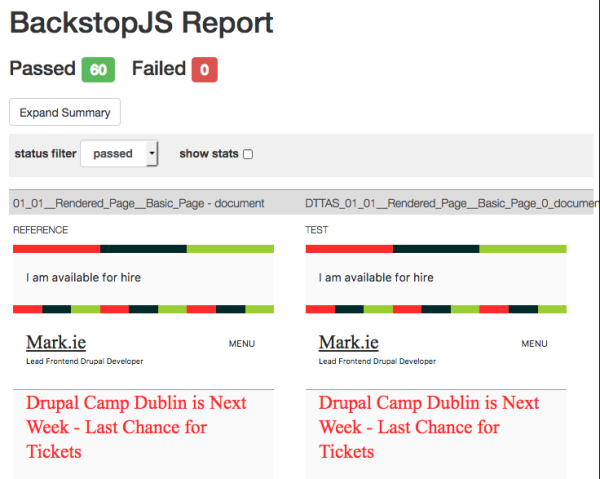
After that, I have Backstop.js set up to regression test all of these, so each time I create a new component I can quickly run the visual regression tests and check that nothing has broken. Since all my CSS/JS is scoped to each individual component, it's rare if something is.

Join the "Something nice ..." newsletter

The full title is "Something nice, something quirky, something else".

I send an email once a week with something nice, something quirky, and something else that I think is interesting (all with a web development theme, of course).

Showing Fields in a Referenced Node Depending on the Value of a Boolean in a Paragraph Bundle

Show Fields in Node Reference Depending on Boolean Value

Mission: you have 2 fields in a Drupal paragraph bundle, one a node reference field and one a boolean field. Show certain fields in the referenced node depending on the value of the boolean field.

That's a question that popped up today in the DrupalTwig Slack. Here's my response, which I implemented a version of recently.  (In that particular case, we had an 'Event' content type with fields for 'address', 'phone number', etc and also a reference field for 'Amenity'. If the fields were filled in in the event content type, they were to be presented, but if they were left blank on the event content type, we had to pull in the corresponding fields for address, phone number, etc from the referenced amenity.) Anyway, my response:

{# Check the value of the boolean field #}
{% if paragraph.field_boolean.value === 'on' %}
  {# Just render the title of the referenced node #}
  {{ paragraph.field_reference.0.entity.label }}
{% else %}
  {# Render the title and the image field #}
  {{ paragraph.field_reference.0.entity.label }}
  <img src="{{ file_url(paragraph.field_reference.0.entity.field_image.url) }}" alt="{{ paragraph.field_reference.0.entity.field_image.url }}">
{% endif %}

{# Ensure that the cache contexts can bubble up by rendering the {{ content }} variable #}
{{ content|without('field_boolean', 'field_reference') }}

Just for clarity - variables in that code snippet are simply made up off the top of my head (this is what happens when answering questions on Slack). I'm sure I have things slightly wrong and you'll need to play with them to get them to work correctly.

Also, the reason for the cache contexts bit? Say thanks to Lee Rowlands from Previous Next for his blog post Ensuring Drupal 8 Block Cache Tags bubble up to the Page

Join the "Something nice ..." newsletter

The full title is "Something nice, something quirky, something else".

I send an email once a week with something nice, something quirky, and something else that I think is interesting (all with a web development theme, of course).

Adding {{ attributes }} to a Drupal PatternLab Theme

Drupal PatternLab Attributes Error

Ever gotten this error: User error: “attributes” is an invalid render array key? Here's what I do to get around it. If you've a better solution, let me know.

When building PatternLab-based Drupal themes, I try to get the Twig in PatternLab to match what I expect from Drupal. So, if I know Drupal has a line like this in its node.html.twig:

<article{{ attributes.addClass(classes) }}>

I want to be able to put the same thing into my PatternLab template - even though I am not going to use the {{ attributes }} in PatternLab. This means then I can simply let the Drupal template extend from the PatternLab one and not need to worry about anything.

However, when you do this, you will often get an error to say "attributes” is an invalid render array key. How do I get that error message to go away? Simple - I just add attributes to my Pattern's .yml file, like so:

attributes:
  Attribute():
    class:

Note: to use this, you need to have the plugin-data-transform by @aleksip (thanks to Aleksip for pointing this out to me on Slack). This can be added to your composer.json require-dev section:

"aleksip/plugin-data-transform": "^1.0.0",

The data.json File

You can do this for each individual pattern, but then you might get an error somewhere else talking about "title_attributes” is an invalid render array key. To get around all these errors, I simply add these items globally to the default data.json file, like so:

  "attributes": {
    "Attribute()": {
      "class": []
    }
  },
  "content_attributes": {
    "Attribute()": {
      "class": []
    }
  },
  "title_attributes": {
    "Attribute()": {
      "class": []
    }
  },
  "rows": {
    "Attribute()": {
      "class": []
    }
  },
  "teaser": {
    "Attribute()": {
      "class": []
    }
  }

The PatternLab Teaser Twig File

Taking the teaser view mode as an example, here's what my PatternLab twig file looks like:

{%
set classes = [
  'node',
  'node--type-' ~ node.bundle|clean_class,
  node.isPromoted ? 'node--promoted',
  node.isSticky ? 'node--sticky',
  not node.isPublished ? 'node--unpublished',
  view_mode ? 'node--view-mode-' ~ view_mode|clean_class,
]
%}
<article{{ attributes.addClass(classes) }}>

  {% if display_submitted %}
    <footer class="node__meta">
      <div class="node__meta--item node__meta--published">Published: {{ node.created.value|date("D d M Y") }}</div>
    </footer>
  {% endif %}

  {{ title_prefix }}
    <h2{{ title_attributes.addClass('node__title') }}>
      <a href="{{ url }}" rel="bookmark">{{ label }}</a>
    </h2>
  {{ title_suffix }}

  {{ content.field_intro }}

</article>

The PatternLab yml (or json) File

Here's the corresponding .yml (or .json) file:

node:
  bundle: article
  isPublished: true
  created:
    value: 1511941986
  changed:
    value: 1512127363

view_mode: teaser

display_submitted: true

label: 'A Blog Post by Mark Conroy, all about PatternLab and Drupal'

content:
  field_intro: <div class="field--name-field-listing-snippet"><p>Duis mollis, est non commodo luctus, nisi erat porttitor ligula, eget lacinia odio sem nec elit. Curabitur blandit tempus porttitor. Sed posuere consectetur est at lobortis. Maecenas faucibus mollis interdum.</p></div>

The Rendered HTML in PatternLab

This will then print our html like so (notice, no attributes):

<article class="node node--type-article node--view-mode-teaser">

      <footer class="node__meta">
      <div class="node__meta--item node__meta--published">Published: Wed 29 Nov 2017</div>
    </footer>
 
 
    <h2 class="node__title">
      <a href="http://example.com" rel="bookmark">A Blog Post by Mark Conroy, all about PatternLab and Drupal</a>
    </h2>

  <div class="field--name-field-listing-snippet"><p>Duis mollis, est non commodo luctus, nisi erat porttitor ligula, eget lacinia odio sem nec elit. Curabitur blandit tempus porttitor. Sed posuere consectetur est at lobortis. Maecenas faucibus mollis interdum.</p></div>

</article>

The Drupal Template File

Next, my node--teaser.html.twig file is as follows (just one line):

{% extends '@content/01-display-types/teaser/teaser.twig' %}

The Rendered Drupal HTML

And that renders html like so (notice, we have attributes that Drupal will use):

<article data-history-node-id="40" data-quickedit-entity-id="node/40" role="article" class="contextual-region node node--type-article node--promoted node--view-mode-full" about="/blog/web-development/add-slider-your-website-if-you-do-not-want-your-visitors-see-your-content" typeof="schema:Article" data-quickedit-entity-instance-id="0">

      ...

</article>

Full disclosure, I came up with this idea about a year ago after seeing something similar in the Bear Skin theme.

You can see this in action on my PatternLab's teaser pattern.

Join the "Something nice ..." newsletter

The full title is "Something nice, something quirky, something else".

I send an email once a week with something nice, something quirky, and something else that I think is interesting (all with a web development theme, of course).

Out of the Box has just been Committed to Drupal Core 8.6.x

Screenshot of part of the homepage of the demo_umami profile

After two years of planning, discussing, and (eventually) coding, the "Out of the Box" initiative has just been committed to Drupal Core.

One of the things most often requested of Drupal has been a better experience "Out of the Box", so that when a new users installs it they see something more positive than a message saying "You have not created any frontpage content yet".

To that end, a strategic initiative called the "Out of the Box Initiative" was set up. I was a member of that team. What we sought to do over the past two years was create a website for a (fictional) publishing company. We decided upon the name "Umami" for a food publishing company, publishing articles and recipes. We went through the full web design process - user stories, validation, requirements gathering, wireframes, design, development ... up to creating what we called the "MEGA Patch". And then submitted about 50 versions of it.

This week we hoped our work would be committed to Drupal 8.5.0-alpha1, but we just missed that deadline. Instead, we had a meeting with the product owners last night to have the final "Needs Product Owners Review" tag removed from the "Create experimental installation profile" issue. Here's the video of that demonstration and meeting:

The referenced media source is missing and needs to be re-embedded.

Following that meeting, the tag was removed and our code was committed to Drupal 8.6.x. This means you'll see it shipping in Drupal in September at the latest, but we hope to get the final beta blockers fixed to have it backported to 8.5.0-beta. If you'd like to help squash some of the bugs, follow these "Out of the Box" issues. Here's the tweet from @webchick (THANKS!) announcing it.

So, what is in this commit?

This commit brings a new installation profile to Drupal. The profile is called "Umami" and has a corresponding "Umami" theme. It creates three content types - basic page, article, and recipe. It has listing pages for articles and recipes, some promotional blocks, a homepage, contact form, and search page. It is a fully-featured (small) website built using only (stable) Drupal core modules.

We are not using experimental modules such as content moderation, layout builder, media, etc. Once they are stable, we hope to bring them into the "Out of the Box" experience as well.

If you'd like to install it, try this link on SimplyTest.me.


Join the "Something nice ..." newsletter

The full title is "Something nice, something quirky, something else".

I send an email once a week with something nice, something quirky, and something else that I think is interesting (all with a web development theme, of course).