Drupal Planet

Integrating a Drupal Text with Image Paragraph Bundle with Patternlab

PatternLab Image with Text Component

Let's get to grips with having a text with image paragraph bundle set up with PatternLab, including having options for left/right for the image/text.

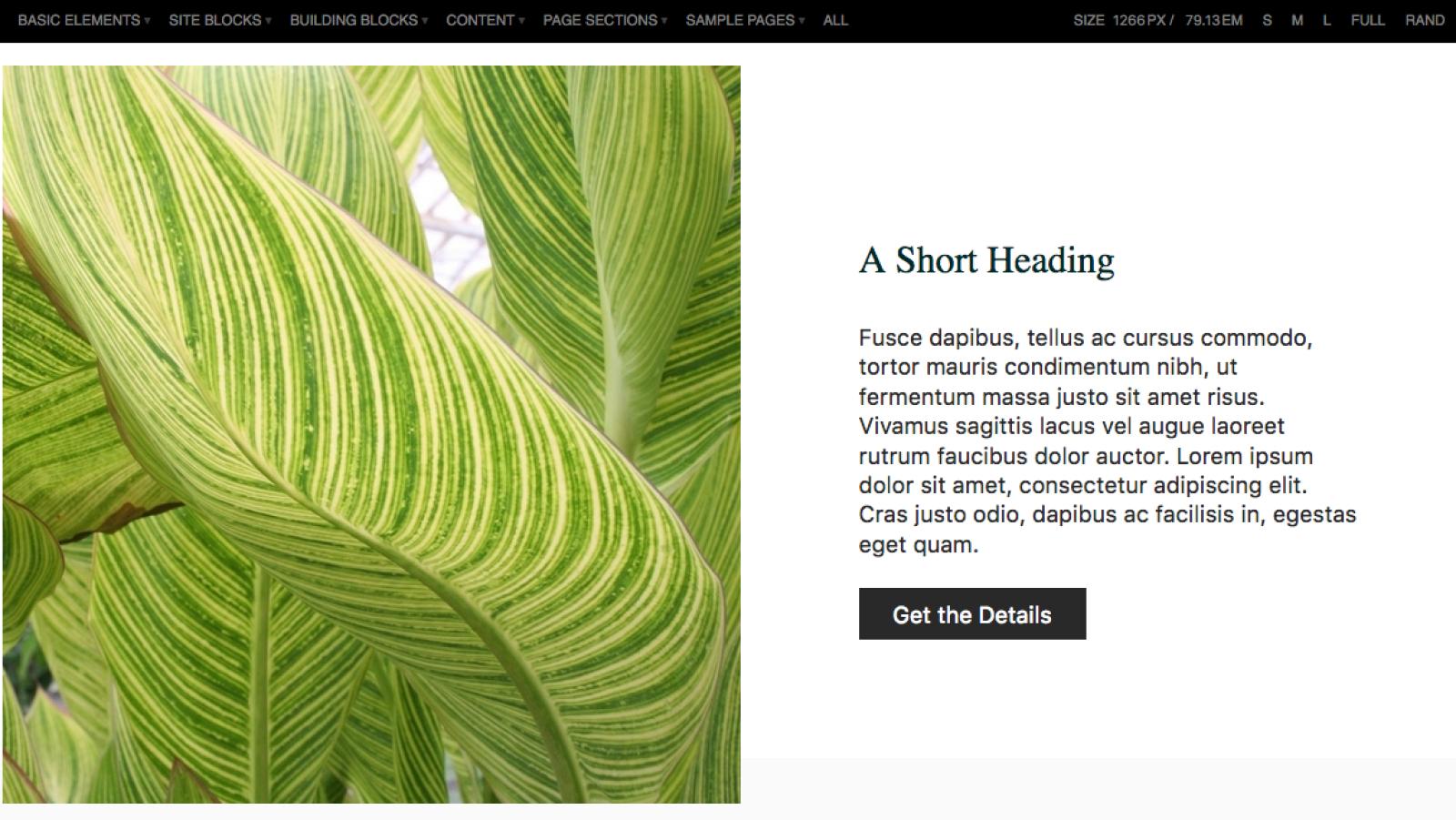
It's a fairly common design pattern for clients to request - upload an image, place text beside it, and choose whether we have the image on the left with the text on the right or vice versa. You can see my PatternLab version of it here.

PatternLab Image with Text Component


Okay, first off, in my twig file, I have the following:

{%
set classes = [
  'image-with-text',
  'layout-contained',
  paragraph.field_p_it_alignment.value,
]
%}

<div class="image-with-text__bg image-with-text__bg--{{ paragraph.field_p_it_style.value }}">
  <div{{ attributes.addClass(classes) }}>

    <div class="image-with-text__image">
      {{ content.field_p_it_image }}
    </div>

    <div class="padding image-with-text__text">
      {{ content.field_p_it_text }}
    </div>

  </div>
</div>

The only thing that is anyway special here is the paragraph.* variables. I have named them like so because this is what Drupal is going to give me back (since the machine name of those fields is p_it_alignment (I namespace all my entity fields with the first letter of the entity type - in this case the name stands for Paragraph Image (with) Text Alignment). This then allows me to have options in PatternLab for alignment and background style (light/dark). To achieve this, I have the following in my pattern's .yml file:

paragraph:
  field_p_it_alignment:
    value: left
  field_p_it_style:
    value: light

And in my image-with-text~right.yml file, I just need to override those variables like so:

paragraph:
  field_p_it_alignment:
    value: right

Following that, I have variables named content.field_p_it_image and content.field_p_it_text. Again, these are deliberately named like so, because this is what Drupal will give us back after I create a field with those machine names. Again and again, I try to keep my pattern variables in PatternLab the same as what I will get back from Drupal so when I come to adding the Drupal template, it's just one line of code to say "Hi Drupal template, you'll find the code for this file over here!". So, you can decide in PatternLab what the machine name for the Drupal fields is going to be and then get your site-builders to create fields with matching names, or you can ask your site-builders what machine names are being used in Drupal and then use those in PatternLab.

In my pattern's .yml file, I then set those variables like this:

content:
  field_p_it_text: '<h2>A Short Heading</h2><p>Fusce dapibus, tellus ac cursus commodo, tortor mauris condimentum nibh, ut fermentum massa justo sit amet risus.</p>'
  field_p_it_image: '<img src="http://placeimg.com/600/600/nature">'

Finally, in our paragraph--image-with-text.html.twig file we have just one line of code:

{% extends "@building-blocks/image-with-text/image-with-text.twig" %}

You can probably guess what the sass looks like:

.image-with-text {
    display: flex;
    &.left {
      flex-direction: row;
    }
    &.right {
      flex-direction: row-reverse;
    }
}

The images with text above is an example of this pattern in use on a Drupal website.


Join the "Something nice ..." newsletter

The full title is "Something nice, something quirky, something else".

I send an email once a week with something nice, something quirky, and something else that I think is interesting (all with a web development theme, of course).

Integrating a Simple Drupal Text Paragraph Bundle with Patternlab

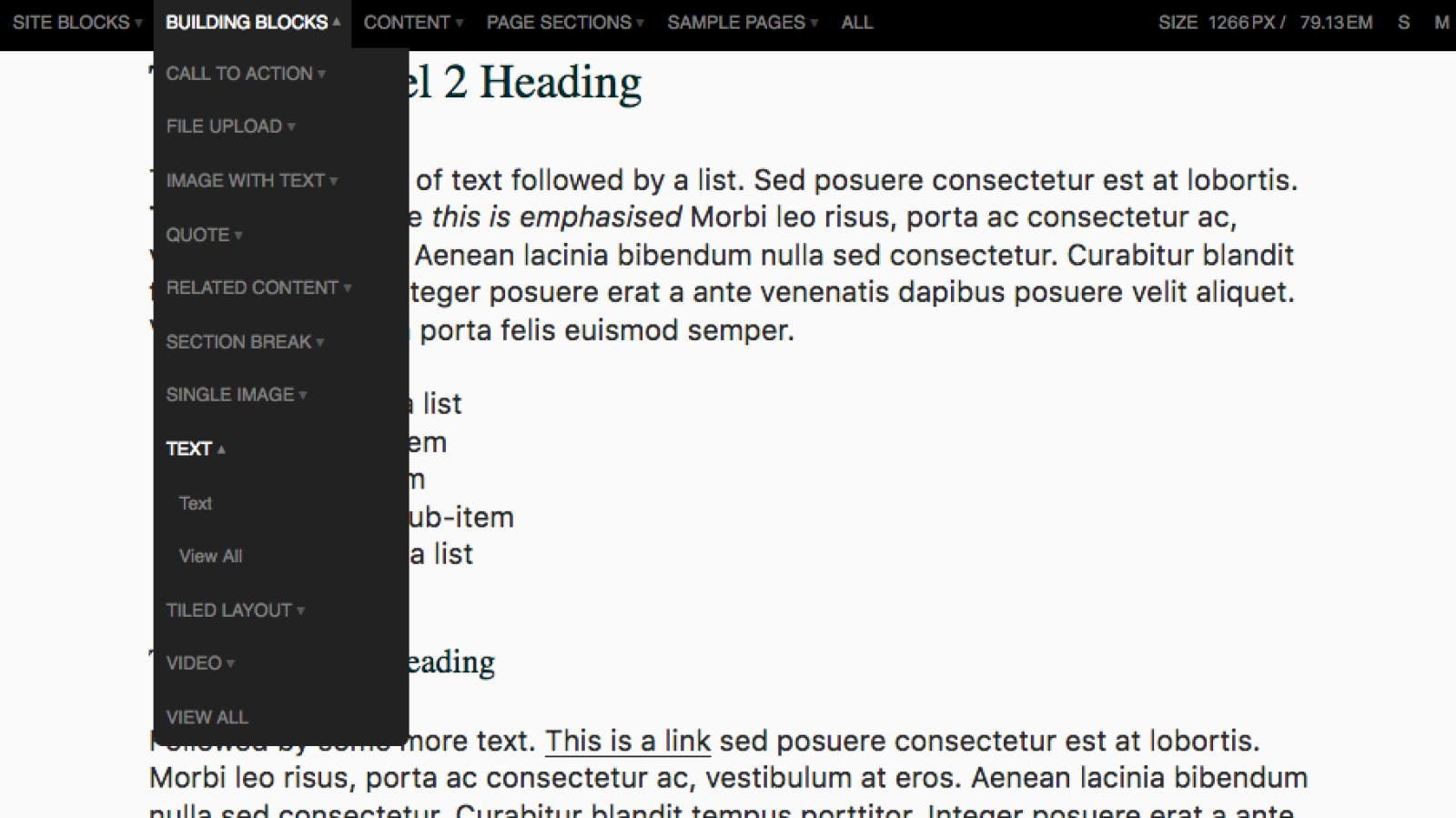
PatternLab Text Building Block Example

This is the first post in a series about how to integrate Drupal with PatternLab. In this first blog post, we'll look at a simple text paragraph bundle, which just has one field: text (formatted, long).

I see a lot of blog posts and talks around about the benefits of using component-based design, about how we should use design in the browser principles to present designs to our clients, about how styleguides are the best way to have sustainable frontends. I've even written some and given many presentations about it myself. What I don't see a lot of is blog posts about how to actually do it.

So, here's how to (or at least how I) integrate my PatternLab theme (it's based on the Phase 2 PatternLab Drupal theme) with a simple paragraph type.

PatternLab

Create a pattern - you can put it wherever your setup says it should go. Paragraph bundles are probably molecules, but I'm not sure how you set up yours. In my case, I have hacked PatternLab and created a folder called "Building Blocks" - this is where all my paragraph bundles go (and then I also have a "Building Blocks" field in each content type - more about my set up in another blog post.

Call the pattern something meaningful - in this case, I call mine "Text". Next, we write the Twig for the text pattern. This can be as simple as this:

{%
set classes = [
  "text"
]
%}

<div{{ attributes.addClass(classes) }}>
    {{ content }}
</div>

Then in my corresponding text.yml or text.json file, I put in some sample content, like so (I like yml):

content: >
  <h2>This is a Level 2 Heading</h2>
  <p>This is a paragraph of text followed by a list. Sed posuere consectetur est at lobortis. <strong>This is strong</strong> while <em>this is emphasised</em> Morbi leo risus, porta ac consectetur ac, vestibulum at eros. Aenean lacinia bibendum nulla sed consectetur. Curabitur blandit tempus porttitor. Integer posuere erat a ante venenatis dapibus posuere velit aliquet. Vestibulum id ligula porta felis euismod semper.</p>
  <ul>
    <li>A text item in a list</li>
    <li>Another text item</li>
    <ul>
      <li>A sub-item</li>
      <li>Another sub-item</li>
    </ul>
    <li>A third item in a list</li>
  </ul>
  <h3>This is a Level 3 Heading</h3>
  <p>Followed by some more text. <a href="#">This is a link</a> sed posuere consectetur est at lobortis. Morbi leo risus, porta ac consectetur ac, vestibulum at eros. Aenean lacinia bibendum nulla sed consectetur. Curabitur blandit tempus porttitor. Integer posuere erat a ante venenatis dapibus posuere velit aliquet. Vestibulum id ligula porta felis euismod semper.</p>

Drupal

Finally, in my Drupal paragraph--text.html.twig file, I extend the above PatternLab file, like so:

{% extends "@building-blocks/text/text.twig" %}

Yes, there is only one line of code in that file.

Some Explanation

Why do I call my variable {{ content }}? Simple, I know that the default variable in Drupal's paragraph module to print the contents of the paragraph is {{ content }}, so if I give my pattern in PatternLab the same variable name, I won't have to worry about matching any variables. I do not need to do something like this:

{% include '@building-blocks/text/text.twig' with {
  content: text
  }
%}

This will become much clearer when we work with more complex paragraph types in later blog posts.

You can see an example of this pattern in PatternLab here, and the text you are currently reading is an example of it in use in a Drupal template. Simple, eh?

Join the "Something nice ..." newsletter

The full title is "Something nice, something quirky, something else".

I send an email once a week with something nice, something quirky, and something else that I think is interesting (all with a web development theme, of course).

Adding Tokens for Metatag Image Fields when using Drupal Media Entity

Metatag Fields set correctly using Media Entity

Metatag cannot directly extract an image url from a media field referenced by another entity.

I upgraded my site from Drupal 7 to Drupal 8 this week (yes, that's why it's running on Bartik - a PatternLab developed theme will be installed in time).

This morning I enabled the Metagtag module and set some defaults for page title, description, image, etc. The help notes on the image metatag field says "An image associated with this page, for use as a thumbnail in social networks and other services. This will be able to extract the URL from an image field." This is true, except in my case, all the image fields on the site use the Media Entity module, so they are entity reference fields rather than image fields.

When I put in a token of [node:field_main_image], the result in the outputted metatags was:

<meta property="og:image:url" content="Mark Conroy | DrupalCon Dublin 2017" />

In that case, "Mark Conroy | DrupalCon Dublin 2017" is the name of the referenced media. I needed to output the image field of the referenced media.

After a little trial and error, I came up with this:

[node:field_main_image:entity:field_m_image_image]

which outputs:

<meta property="og:image:secure_url" content="https://mark.ie/sites/default/files/media/images/2017-10/mark_presenting_1.jpg" />

In this case, "field_main_image" is the name of the image field on my content type, and "field_m_image_image" is the name of the image field on my image media bundle.

If you wish to output a specific image style, you can append :default:url to the token like so:

[node:field_main_image:entity:field_m_image_image:default:url]

or

[node:field_main_image:entity:field_m_image_image:large:url]

To use the image media item's alt tag for your Twitter alt tag, you can do this:
 

[node:field_main_image:entity:field_m_image_image:alt]

I hope that helps!

Join the "Something nice ..." newsletter

The full title is "Something nice, something quirky, something else".

I send an email once a week with something nice, something quirky, and something else that I think is interesting (all with a web development theme, of course).

Drupal Camp Dublin is Next Week - Last Chance for Tickets

Mark Conroy | DrupalCon Dublin 2017

Seems like just yesterday since we held DrupalCon in Dublin, now we're back with our annual Drupal Camp Dublin.

This year's Drupal Camp Dublin has a great line up of speakers from Ireland and abroad, covering such topics as:

  • Building multi-lingual, multi-region websites (Stella Power)
  • Working as a developer with attention-deficit disorder - add (Levi Govaerts)
  • Planning for disruptions (Jochen Lillich)
  • Migrating from Drupal 4 to 5 to 6 to 7 to 8 (Alan Burke)
  • Automating deployments (Luis Rodriguez)
  • Working webform and commerce and paragraphs and display suites and more (Chandeep Khosa)
  • Live debugging a site that's giving issues (Anthony Lindsay)
  • Stop estimating, start forecasting (Mike King)
  • Deploy with Fabric, and test driven development (Oliver Davies)
  • Design in the Browser (yours truly, me, Mark Conroy)
  • Teaching web development at third level (Ruairi O'Reilly)
  • The QA process (Daniel Shaw)
  • Getting started with Docker (Ed Crompton)
  • The new theme coming to Drupal core (Mark Conroy)

And then there's some socials, and our Drupal Ireland AGM, and at least one other talk not announced yet, and ... you get the idea.

The full schedule is available on our website. There are some tickets left (only €20), get them before they are all gone.

Join the "Something nice ..." newsletter

The full title is "Something nice, something quirky, something else".

I send an email once a week with something nice, something quirky, and something else that I think is interesting (all with a web development theme, of course).

A (simple) Plan for Everyone to Get a Free T-Shirt at DrupalCon

You know you want a t-shirt at DrupalCon Vienna, right? I do. read on...

At this year's DrupalCon in Vienna, the Drupal Association will only be providing 'free' t-shirts to people who purchase an early bird ticket (not exactly 'free' when the ticket costs almost €500) - a position I don't agree with (if you can't afford to give a t-shirt in a welcome pack when charging €500 a ticket, there seems to be something drastically wrong with your business model).

After a tweet last night of me sporting a Druid.fi t-shirt that I received at DrupalCon Dublin, I got thinking: how can we do something to make sure everyone gets a free t-shirt? Then I thought, 'why not provide our own'? Heaven knows we all have loads of them.

So, here's the plan. Everyone brings a Drupal-related t-shirt to DrupalCon. It could be one from your company, one from a previous DrupalCon (I've never been to an non-European one so would like one from somewhere else in the world), one from your local DrupalCamp, a DevDays t-shirt, etc. Then, after the Driesnote, while we are all getting into position for the group photo you give that t-shirt to someone of a similar size to you, and they give you they one they brought (if they brought one). Feel free to bring more than one t-shirt to cover those who don't bring any (it might be some people's first Drupal event).

Oh, and by the way, my size is 'medium'!

Join the "Something nice ..." newsletter

The full title is "Something nice, something quirky, something else".

I send an email once a week with something nice, something quirky, and something else that I think is interesting (all with a web development theme, of course).

Mossack Fonseca's Website is Still Available for Hacking

Mossack Fonseca's 'client portal' (the part where all the information the world is interested in was uploaded) is running on a version of Drupal (7.23) that they haven't updated in over 3 years. We're now on version 7.43.

There was a MASSIVE deal when 7.32 came out as it patched a very serious security hole. If you're site wasn't patched within 7 hours, you could consider it hacked. We had all ours patched within 45 minutes.

Not keeping your website's security update patches applied will get you in trouble.

They still haven't updated their website, so if you wanted to hack them again, you could simply use one of these scripts: https://github.com/…/drupalg…/blob/master/attack/exploit.php

(P.S. I am NOT suggesting anyone should hack them - just illustrating how easy it is - be careful when you trust your sensitive information to others.)

If you're anyway interested, the theme to power their portal cost a whopping $48.

And it seems their server is running on PHP 5.2, which reached end of life over 5 years ago.

Join the "Something nice ..." newsletter

The full title is "Something nice, something quirky, something else".

I send an email once a week with something nice, something quirky, and something else that I think is interesting (all with a web development theme, of course).

Announcing: The Drupal Showcase Podcast

As the title says, I am announcing the launching (soon) of the Drupal Showcase Podcast. This will be a forthnightly podcast showcasing the best new Drupal websites.

Each show will be a friendly conversation (lasting approximately 30 minutes) giving participants a chance to share their thoughts on a recent project, how it was built, what others can learn from it, and contributions made to the Drupal community from the project.

The site is complete in terms of functionality, some more theming is needed, and some more interviews need to be added to the backlog. I'm hoping to launch within about 6 weeks.

In the mean time, join the mailing list for updates and/or suggest a website for the podcast, or chat with me at DrupalCon Barcelona about participating in a show.

Thanks, and keep Drupalling!

(Oh, and the website is here: http://dscpc.mark.ie)

Join the "Something nice ..." newsletter

The full title is "Something nice, something quirky, something else".

I send an email once a week with something nice, something quirky, and something else that I think is interesting (all with a web development theme, of course).

Revert a Drupal Database Update

Sometimes, when testing an update hook to a Drupal module, you may need to revert it.

For example, you are setting some permissions for a certain role, you run the update but then realise there was another permission you should have enabled. Instead of adding another update hook, you can revert the update you just ran, amend your update hook, and then re-run the update.

Note*: this is only for reversible changes - like adding/removing permisisons; it will fail if the update had created a new field for example.

It's as simple as this SQL query:
update system set schema_version = XXXX-1 where name = 'module_name';

This means, you are telling your database to update the table 'system' using scheme_version 'XXXX-1' (this will be something like 7001 or 7137 or whatever N equals in your hook_update_N() function minus 1, so if the update was hook_update_7138 you would use 7137 where XXXX-1 is), and apply this update to 'machine name of the module'.

Note*: Do not try this unless you know what you are doing. Make sure you have a backup of your database in case things go wrong - of course you do, don't you?

*Note - notes were added from items left in the comments, to bring them to the body.

Join the "Something nice ..." newsletter

The full title is "Something nice, something quirky, something else".

I send an email once a week with something nice, something quirky, and something else that I think is interesting (all with a web development theme, of course).

Setting up CoderDojo in Portumna Galway

I love Karl Marx's maxim, from each according to his abilities, to each according to his needs.

I try to live my life along the lines of open source philosophy. Actually, I try to live my life following the tenets of anarchism - no hierarchies, a system of relations towards others built on trust, friendship, helping each other, solidarity, and distributed leadership (if leadership is the right word here).

When I came upon open source software (specifically Drupal), I quickly realised that anarchism and open source software have so much in common. Drupal is distributed, it is without formal leaders (except Dries as project lead - I know, this is a very simplistic reading of Drupal's set up). Developers work in solidarity/cooperation with each other, sharing code and knowledge to build the best product we can. We are friends, we trust each other.

It was inevitable, then, that I would think an organisation such as CoderDojo was such a good idea. Many, many groups around the world. Everyone helping each other to learn. All sharing knowledge. However, living in a small town in rural Ireland, I wasn't sure it would work here - we don't have coders, we don't have a meeting room, we don't ... Hang on. Let's not be negative, let's give it a try.

So tonight, we have our inaugural meeting of Portumna CoderDojo in the local adult education centre. With use of the computer room. And me as mentor. And some more parents as supervisors. And about 20 kids ready to start coding.

This looks workable. And exciting. Wish us luck.

Join the "Something nice ..." newsletter

The full title is "Something nice, something quirky, something else".

I send an email once a week with something nice, something quirky, and something else that I think is interesting (all with a web development theme, of course).

How to create Drush Aliases (shortcuts) in bash - make your life even easier

I'm lazy. So I create shortcuts. You should be like me!

When site building in Drupal, I am constantly using the drush si (site install) command to rebuild the site and check that my new feature is working correctly. Whilst this is a great way to get the site re-installed in super-quick time, it has a built in security feature of creating a user called admin (fine by me) and a new password for this user (which I then change to something simple like "admin" - just for development purposes). This is quite simple:

drush user-password admin --password="admin"

When I'm given a new project to work on, the first thing I do with my local instance is set the admin password to "admin".

To speed things up, I decided to write a drush alias to make these two use-cases easier to manage (yes, I know, first world problems!). And then I thought, why not share this and some of my other aliases. So, here goes (with comments):

alias dr='drush' // general alias for drush
alias drcc='drush cc all' // clear all the caches
alias drup='drush up' // update core and contrib modules
alias drupdb='drush updb' // run update.php
alias dren='drush en' // enable a module/theme
alias drdis='drush dis' // disable a module/theme
alias drfl='drush fl' // list all features on the site
alias drflo='drush fl | grep Overridden' // list all overridden features
alias drfu='drush -y features-update' // update a feature - you must put the feature's name after this
alias drfua='drush -y features-update all' // update all feature
alias drfr='drush -y features-revert' // revert a feature - you must put the feature's name after this
alias drfra='drush -y features-revert all' // revert all features
alias drpad='drush user-password admin --password="admin"' // change password for user admin to admin

Note: to get these working, I put them in my bash_profile file. Every time I add a new one, I run source ~/.bash_profile to reload the file and make the alias available to drush.

What aliases do you use?

Join the "Something nice ..." newsletter

The full title is "Something nice, something quirky, something else".

I send an email once a week with something nice, something quirky, and something else that I think is interesting (all with a web development theme, of course).